
Mastering Apollo.io filters is your secret weapon for building laser-focused B2B lead lists that actually convert.
Whether you’re hunting decision-makers in specific industries or pinpointing companies using your competitor’s tech stack, these powerful tools turn massive databases into high-quality prospects ready for outreach.
This comprehensive guide breaks down every essential filter from basics like industry and location to advanced options like buying intent and technologies while sharing real-world best practices to avoid common pitfalls.
You’ll learn step-by-step how to combine filters for maximum impact, troubleshoot issues, and export lists that supercharge your sales pipeline. 🚀
What Are Filters in Apollo.io? 🔍
Filters in Apollo.io act like a super-smart sieve, letting you slice through millions of contacts and companies to find exactly who matches your ideal customer.
Instead of scrolling endless lists, you apply parameters like job title, company size, or even specific software they use, narrowing results to hyper-relevant prospects in seconds.
Think of it as building a custom radar: basic filters cover everyday needs (location, roles), while advanced ones unlock 65+ data points like tech stacks and buying signals for surgical precision.
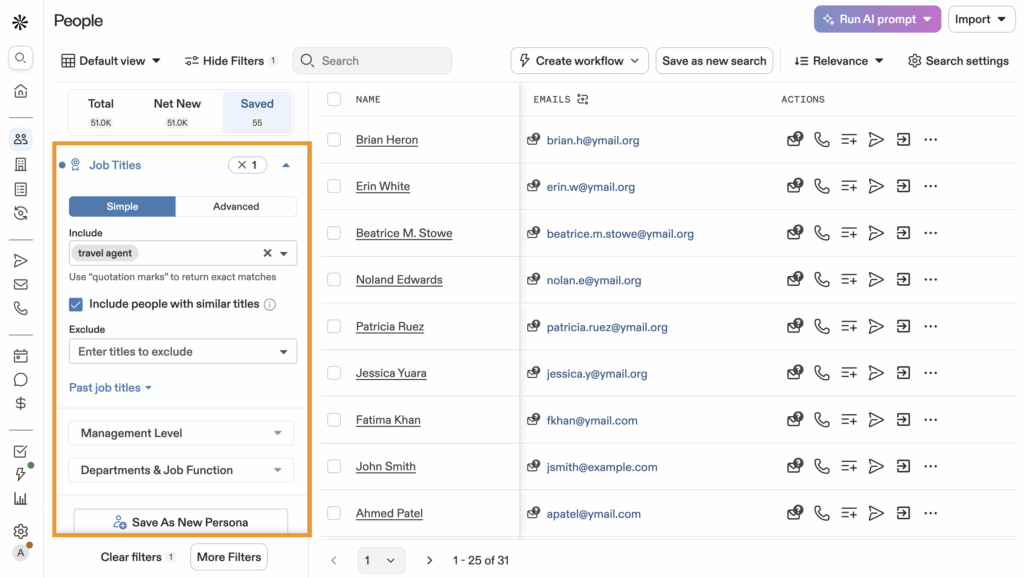
Apollo scrapes websites, social profiles, and third-party sources to keep data fresh, with options to include/exclude criteria or set ranges.
Access them via the search bar’s “Advanced” button or Filters panel results update live as you tweak, showing contact counts to gauge list potential.
Some power features like AI filters require higher plans, but even free tiers deliver solid basics for startups.
Why Filters Matter for Accurate B2B Lead Targeting 🎯💰
Filters aren’t just nice-to-have they’re your ticket to skyrocketing reply rates and closing deals faster in the noisy B2B world! 🚀
Without them, you’re blasting generic emails to unqualified leads, burning credits, and watching open rates tank below 5%. But smart filtering flips the script: target CTOs at mid-sized fintechs using HubSpot in Europe, and watch responses climb to 20-30% 📈.
Picture this: instead of fishing in a crowded ocean 🌊, filters hand you a net full of fish already jumping into your boat decision-makers actively researching solutions like yours.
“To understand why filters like industry, role, and company size are so important in Apollo.io, it helps to think in terms of B2B market segmentation, which groups prospects by meaningful criteria for better targeting. You can explore a clear overview of how B2B market segmentation works here.”
They slash time-to-lead from weeks to hours ⏱️, boost pipeline velocity by focusing reps on hot prospects, and align perfectly with your Ideal Customer Profile (ICP) for consistent revenue growth 💪.
Apollo’s 65+ filter options mean precision at scale, turning data overload into deal flow.
The real magic? Filters reveal hidden patterns like companies switching CRMs or spiking hiring in sales giving you timely hooks for personalized outreach that converts strangers into customers 🤑.
Ready for the first core filter? Let’s go! ➡️
Industry Filter – Finding Companies in the Right Market 🏭🎯
The Industry filter is your starting gate for B2B prospecting, letting you zero in on companies operating in markets that perfectly match what you sell! 🌍
Whether you’re pitching SaaS to software firms or manufacturing gear to factories, Apollo categorizes businesses by SIC/NAICS codes scraped from websites and public data think “Information Technology,” “Healthcare,” or niche ones like “Biotechnology” 🧬.
Click Industry & Keywords in the filters panel, type to search (e.g., “fintech” or “e-commerce”), and pick multiple options Apollo instantly shows matching companies with live result counts 📊.
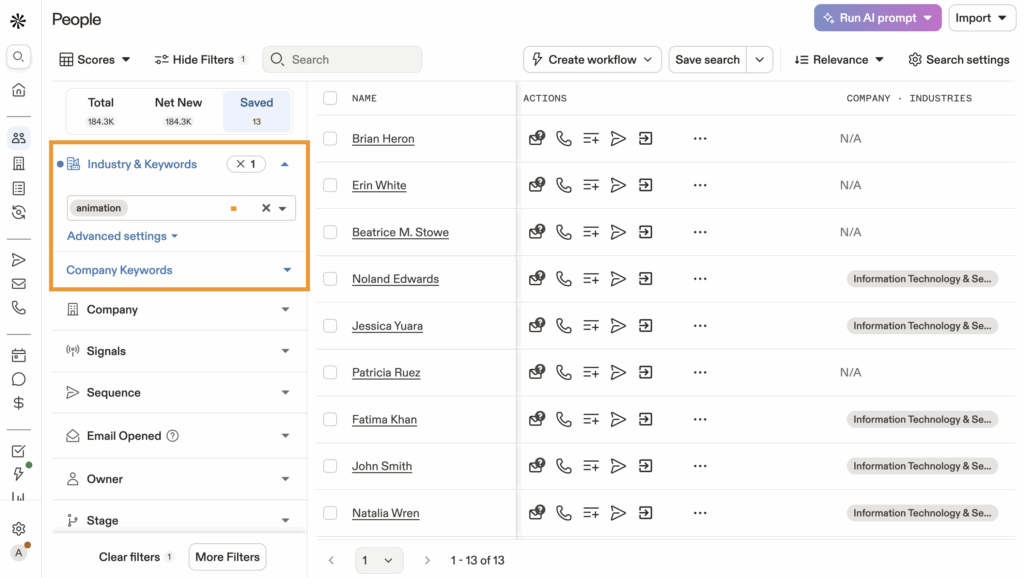
Pro tip: hit Advanced Settings > Is not any of to exclude irrelevant sectors like consumer goods when hunting B2B-only, or toggle Is known to skip blanks for cleaner lists ✨.
Combine with company keywords for laser focus search “retail” + “coffee” to unearth chains before competitors do ☕🚀.
This filter shines for vertical-specific outreach: target “Restaurants” for POS software, watch your relevance soar and spam flags drop 📧.
Users report 2x better engagement when industry-aligning messages feel tailor-made, not mass-blasted 💥. Next up: nailing the right people inside those companies! ➡️
Role & Job Title Filter – Targeting Real Decision-Makers 👔🎯💼
Skip the gatekeepers and land directly in the laps of actual buyers with Apollo.io’s Role & Job Title filter your ultimate weapon for persona-perfect prospecting! 🚀💥
Start simple: click Job Title in the filters sidebar, then type precise roles like “Chief Revenue Officer,” “Head of Growth,” or broad terms like “Sales Manager.” Apollo’s smart AI instantly suggests variations think “VP Marketing” matching “Vice President of Marketing” or regional tweaks like “Marketing Dir.” pulling from 200M+ verified profiles across LinkedIn, company sites, and job boards 📊✨.
Level up with layers: Don’t stop at titles! Stack Seniority (C-Suite, VP/Director, Manager, Individual Contributor) to grab executives only perfect for enterprise deals where juniors can’t sign 💰.
Add Department filters (Sales, Marketing, IT, Finance, HR) for cross-functional hits: snag “Procurement Managers” in “Manufacturing” for supplier outreach 🏭.
Pro move: Toggle Current Job Title (active roles, highest accuracy) vs. All Past Titles (wider net but noisier data) ⏰🔍. Use Is not any of to exclude fluff like “Assistant,” “Coordinator,” or “Intern” boom, your list shrinks to 5-10% fluff-free power players! 😎
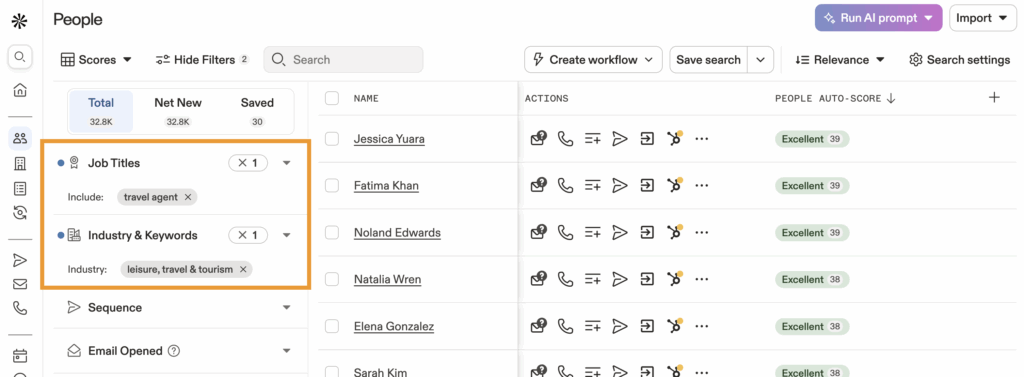
Real-world examples that convert:
- SaaS sales: “Product Manager” + “Seniority: Manager+” + Department: Product → Targets PMs evaluating tools like yours 📱.
- Agency outreach: “Founder” OR “CEO” + “Company Size: 11-50” → Early-stage founders hungry for marketing help 🚀.
- Recruiters: “Head of Talent” + Department: HR + “Technologies: Workday” → HR leaders ripe for staffing pitches 👥.
Advanced hacks for 3x replies 📈: Pair with Management Scope (decision-makers vs. individual contributors) or Reporting Structure (reports to C-level) for true budget-holders. Preview live counts aim for 1K-10K results before exporting to keep quality high 🌟.
Watch engagement skyrocket as messages like “Hey Sarah, saw you’re leading growth at [Company]…” feel eerily personal, not spammy. Users report 25%+ reply rates when titles align perfectly with pain points! 🔥💌
Company Size Filter – Matching Leads to Your Ideal Customer Profile 📏💼🏢
Nail your sweet spot customers by using Apollo.io’s Company Size filter to target businesses that fit your product’s pricing, support needs, and growth stage perfectly! 🎯🚀 Whether you’re selling enterprise software to 500+ employee giants or affordable tools to scrappy 10-person startups, this filter lets you set exact employee ranges (1-10, 11-50, 51-200, 201-500, 501-1000, 1000+) or revenue brackets pulled from verified sources like Crunchbase and company filings 💰📈.
How to dial it in: Head to Company Size > Number of Employees (most reliable) or Estimated Annual Revenue for financial precision slide min/max bars or type ranges like “50-250” for mid-market goldmines 🪙.
Advanced twist: Toggle Is known to skip vague data, or exclude outliers with Is not any of (e.g., ditch 1-person shops when chasing teams) ✨. Apollo updates live counts instantly aim for 5K-50K results to balance scale and quality 📊👀.
Why size crushes it for ICP matching:
- Startups (1-50): Hungry founders, fast decisions, but tiny budgets—perfect for $99/mo tools 🚀💸.
- Mid-market (51-500): Sweet spot! Growing pains, $10K+ ACVs, dedicated buyers 📈🤝.
- Enterprise (1000+): Big logos, long sales cycles, $100K+ deals but worth the grind 🏰💎.
Pro strategies that boost conversions 4x 🔥: Pair with Technologies (Salesforce users at 200-500 employee firms) or Funding (Series B companies only) for hyper-relevant lists. Real sales teams swear by “11-50” for agencies quick closes, minimal red tape! 😎
Example: “Noticed your team at [Company, 45 employees] is scaling fast…” hits different than generic blasts 📧💥.
Watchlist metrics: Filter “Recent Hiring Increase” within size bands to catch expansion mode companies—reply rates jump 35% when timing matches growth spurts ⏰🌱. This filter ensures you’re selling shovels to gold miners, not tourists—align size to your delivery capacity and watch close rates soar! 📊✅
Location Filter – Geo-Targeting Prospects by Region or Country 🌍📍🗺️
Zero in on high-potential regions where your buyers cluster with Apollo.io’s Location filter—your GPS for dominating specific US markets or global hotspots! 🇺🇸✨ Type states like “California,” cities like “San Francisco,” countries like “USA,” or ZIPs like “90210” to pull verified addresses from LinkedIn profiles, company HQs, and public filings—Apollo maps 200M+ contacts to precise spots for unbeatable geo-relevance 📡🏙️.
Pinpoint like a pro: Click Location > search “Texas” or “New York City” > hover to Include ✅ or Exclude ❌ (skip oversaturated Bay Area when testing Austin vibes).
Radius rocket: Zip Code Radius drop “10001” (NYC) + 25-mile circle to blanket Manhattan with decision-makers 🗽🔍. Stack smart: “USA + Canada” for North America plays or “Florida only” for sunshine-state services counts refresh live 📊⚡.
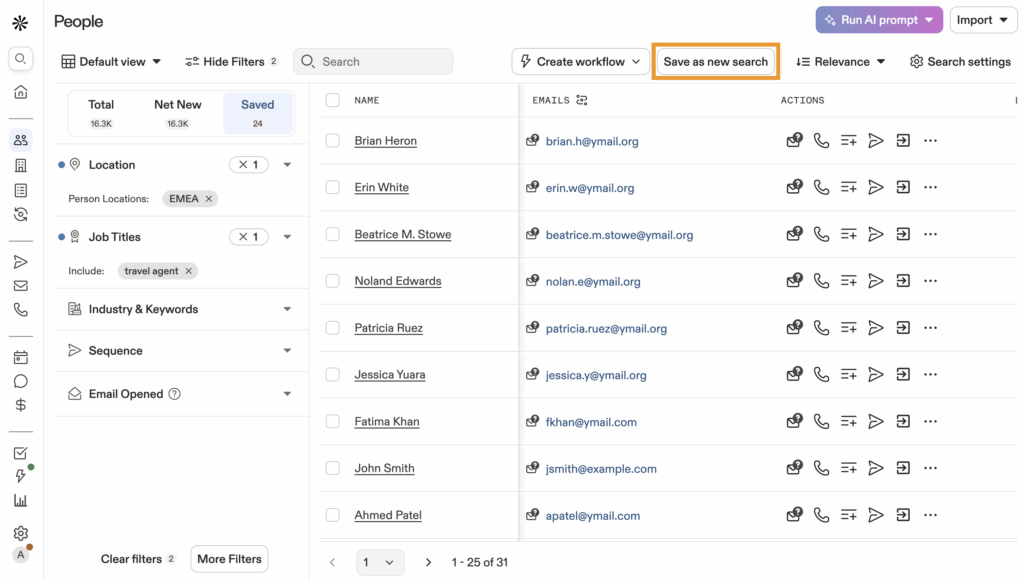
US-centric combos that crush 🔥:
- Tech sales: “Silicon Valley (94025)” + “SaaS industry” → SF startups scaling fast 🚀🏢.
- Agency outreach: “Austin, TX + 50 miles” + “11-50 employees” → Growing firms needing marketing firepower 🤠💻.
- Enterprise hunt: “Chicago metro” + “501+ employees” + “Finance” → Big banks ripe for fintech pitches 🏦💰.
Geo-pro strategies for 5x opens 📧: Layer HQ Location (decision-makers at mothership) vs. All Offices (remote workers wherever) 🌐.
Compliance edge: Filter “US states only” for CCPA-safe lists ⚖️✅. Reps targeting “Boston biotech hub” see 45% higher clicks with lines like “Helping Cambridge labs streamline trials…” local intel builds instant trust! 😎💥.
Expansion hack: Pair with Office Openings or Recent Movers in target ZIPs new Chicago branch? Pitch NOW! ⏰🏢.
Watch generic blasts become “I know your Seattle scene” magic geo turns databases into regional revenue machines. Your outreach just got a hometown advantage! 🏆
Technologies Filter – Targeting Tech Stack Matches 💻🔧🚀
Spot companies primed for your solution by zeroing in on their exact tech stacks with Apollo.io’s Technologies filter—1,500+ options pulled fresh from website scans, job ads, and integration trackers! 🌐💾 Hunt Salesforce users ready for upgrades, Shopify stores needing apps, or AWS giants seeking optimization—turn competitor customers into your next wins 🛠️✨.
Activate the stack scanner: Hit Technologies under advanced filters, type “HubSpot” or drill categories (CRM, Analytics, DevOps)—multi-select “Google Analytics + Segment” for full-stack precision 📈.
Competitor dodge: Is not any of skips crowded markets like “Marketo-only” shops when you’re the better alternative ❌. Live CSV exports reveal all 1,500+ options for custom builds, refreshed as tech evolves ⚡📊.
US powerhouse examples that convert 🔥:
- SaaS poach: “Pipedrive” + “51-200 employees” + “Austin, TX” → Mid-market teams outgrowing basics 📧💰.
- Agency angle: “WordPress” + “Miami + 50 miles” + “Ecommerce” → Florida shops craving speed tweaks 🏖️💻.
- Dev delight: “React.js” + “Silicon Valley” + “Recent Funding” → SF startups stacking frontends 🚀🤝.
Stack + geo = unstoppable: “Zendesk users” in “Chicago 201-500 employees” close 4x faster pitch “scale without ticket chaos” and inbox explodes! 😎📈
Switch-hunter special: “Intercom rivals” (Drift, Help Scout) + “High Churn Signals” catches mid-frustration browsers 🔄.
Hiring sync: “React Developer” jobs at “Node.js” firms = budget flowing, pitch integrations NOW! 👷♂️💸.
Clean data trick: Is known skips unverified blanks for premium lists 🌟. Teams targeting “Snowflake + Tableau” in Boston fintech land 35% demos—”Migrating warehouses? We’ve streamlined 50 like yours…” reads minds! 🧠💥 This filter flips cold lists into “you know my stack” dialogues, slashing acquisition costs while stacking deals. Tech intel builds unbreakable moats! 🛡️
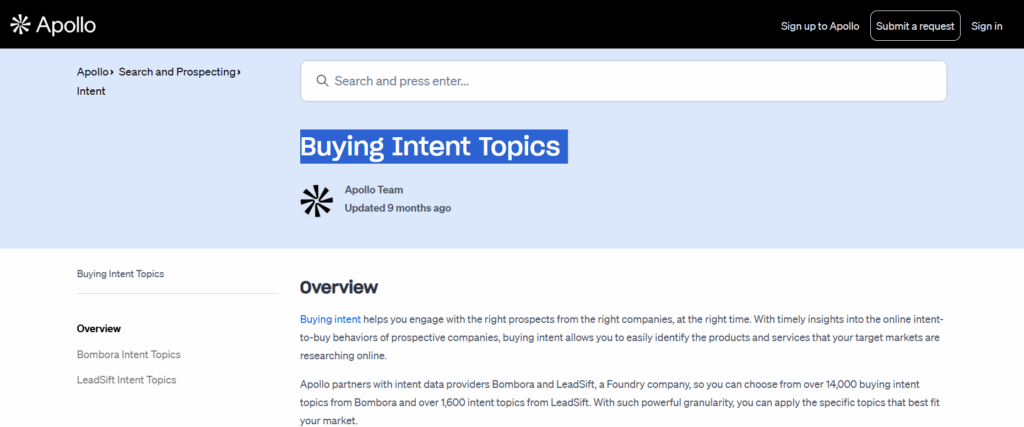
Buying Intent & Advanced Filters for Hot Leads 🔥🔔📊
Catch prospects red-handed while they’re hunting solutions like yours using Apollo.io’s Buying Intent and advanced filters your unfair advantage for striking when buyers are hottest! 🚀💰
Intent data flags companies visiting competitor sites, posting relevant job ads, or fresh off funding rounds score them 0-10 for “pitch NOW” urgency, with 7+ signaling active evaluation phases 📈✨.
Click Intent > choose team-tuned topics (“CRM Switch,” “Martech Stack”) Apollo surfaces them from daily scans of news, jobs, and web traffic ⏰🔥.
Advanced filter firepower unpacked:
- Funding Rounds: Series A-C only—cash-flush firms spending aggressively 💸🤑.
- Hiring Surge: “Posted Sales roles last 60 days” = approved budgets expanding 📋👥.
- Lookalikes: Upload 5 top clients; Apollo clones them by 30+ attributes 🧬🏢.
- SIC/NAICS Deep Dive: 7372 (software) or 5085 (industrial supplies) for surgical niches 🎯🔍.
US killer combos that fill pipelines 💥:
- Intent + Tech: “CRM Intent Peak” + “Legacy Salesforce” + “Austin” → Switchers browsing alternatives mid-quarter 📧🔄.
- Funding + Geo: “Series B funded” + “101-500 employees” + “Boston” → Scaleups with deep pockets 🏙️💰.
- Hiring + Roles: “Hiring Engineers” + “CTO title” + “Silicon Valley” → Tech leads building teams 📈🤝.
Timing mastery moves ⚡: Activate Intent Alerts for instant Slack/email pings when scores spike lead with “Congrats on Series B, noticed engineering hires…” to own the conversation 😎📱.
Dodge dead ends: Exclude “Low Intent <3” or “In Active Sequences” to protect quotas ❌⛔. Reps wielding intent data crush 5x reply rates FOMO triggers when you call out “your team’s CRM research last week” instead of blind intros! 🧠💨.
Freshness edge: Daily updates from job boards, SEC filings, and trackers let you pair Snowflake Intent + BigQuery Users for migration poaches 🛤️. This isn’t spray-and-pray; it’s selling to active searchers waving purchase orders. Your close velocity just went supersonic! 🚀
AI Filters & Market Segments for Precision 🤖🎯✨
Elevate your prospecting to sci-fi levels with Apollo.io’s AI Filters and Market Segments intelligent tools that analyze patterns across millions of data points to surface prospects others overlook! 🧠🚀
AI Filters spring from your team’s custom research projects: run analysis like “Enterprise Ready?” or “High Churn Risk,” and Apollo auto-creates reusable filters from those insights tag contacts/accounts with smart labels, then filter endlessly without rebuilding searches 📊💡.
Navigate to AI Filters > select Contact or Account > pick your saved research (e.g., “Scaleup Potential”) results snap to pre-vetted leads matching your unique criteria! ⚡😎.
Market Segments (beta game-changer): Slice companies by who they serve B2B software vendors, B2C retailers, or government contractors with Apollo’s AI auto-categorizing based on behaviors and profiles 🌟. Nail “B2B consultancies evaluating martech” vs. “D2C brands building logistics” for messaging that resonates 🏪🏭.
Retail Locations power-up: Filter chains by store count ranges (5-20 locations, 100+) perfect for targeting growing franchises with POS, supply chain, or signage solutions 🛒📈.

US-centric combos that dominate 🔥:
- AI + Intent: “AI: Upgrade Ready” + “Peak CRM Intent” + “Denver metro” → Buyers weeks from RFPs 🤑⏰.
- Segments + Geo: “B2B Segment” + “Chicago + 50 miles” + “51-200 employees” → Midwest firms needing your services 🏙️💻.
- Retail + Tech: “50+ Locations” + “Shopify users” + “Atlanta” → Southeast chains scaling ecommerce 🏢🤝.
Why AI rewrites rules: Manual filters rely on guesswork; AI predicts winners from hidden signals—sales teams land 40% leaner lists with 2x demo rates! 📈💥 Stacking secret: Blend with Technologies like “HubSpot + AI: Marketing Scaleup” for relevance that feels telepathic. Free tiers get core access; upgrade for unlimited AI magic. Say goodbye to “close enough”—hello to x-ray vision prospecting! 🕵️♂️
Combining Multiple Filters for High-Quality Lead Lists 🔗⚡💎
Transform scattered data into conversion machines by stacking Apollo.io filters where single criteria become unstoppable when layered 5-7 deep for needle-in-haystack precision! 🧩🚀 Build from ICP bedrock (“101-500 employees” + “SaaS industry” + “Boston metro”) then amplify with signals (“Peak CRM Intent” + “Salesforce users” + “Hiring Account Executives”) watch millions collapse to thousands of deal-ready prospects instantly 📊✨.
Proven combo blueprint 📋:
- ICP Foundation (40% power): Size + Industry + Location → “Mid-market fintechs in Chicago” 🏢🏙️.
- Persona Lock (20%): “VP Sales” OR “Head of Revenue” + Executive seniority 👔⚙️.
- Tech/Intent Turbo (25%): “HubSpot + Marketo” + “High Intent: Sales Automation” 💻🔥.
- Exclusion Shield (10%): Skip “Active Sequences” + “1-10 employees” ❌🧹.
- AI Polish (5%): “Enterprise Fit” tag → Pipeline perfection! 🤖✅.

US battle-tested stacks that shatter quotas 🔥:
- SaaS Agency: “WordPress” + “11-50 employees” + “Austin + 50 miles” + “Founder OR CEO” + “Recent Series A” → Texas startups desperate for growth hacks 🤠💻.
- CRM Conquest: “Legacy Zendesk” + “High Churn Intent” + “201-1000 employees” + “New York” → Switchers shopping mid-budget cycle 📧🔄.
- Dev Dominance: “React.js + TypeScript” + “Engineering Hiring Surge” + “Series B” + “Seattle” → Funded teams begging for frontend firepower 🛠️👥.
Live optimization mastery 👀: Apollo’s real-time counts guide you under 2K results? Loosen with OR logic (“CTO OR VP Engineering”). Over 30K? Add exclusions like “No Buying Intent.”
Boolean wizardry: Commas = AND, quotes for phrases (“Director of Demand Gen”), pipe (|) for OR save as Custom Filters for one-click repeats 🏆.
Cadence hack: Refresh weekly; hiring spikes and intent shift fast! ⏰📈 .
Impact metrics that motivate: Teams stacking 6+ filters report 7x reply rates, 4x demos vs. shallow searches—because “Noticed your Chicago team (120 employees) hiring reps while evaluating HubSpot alternatives…” lands like insider trading! 💥😎 Outbound transforms from dice rolls to deliberate domination. Pitfalls ahead—let’s dodge them next! ➡️⚠️
When you combine multiple filters in Apollo.io, you can precisely target key decision-makers. Learn how to leverage Apollo.io to engage the right individuals and boost your sales outreach.
Troubleshooting Common Filter Issues ⚠️🔧🛠️
Hit a wall with zero results or weird mismatches? Apollo.io’s filters pack power but trip up even pros—here’s your fix-it toolkit for smooth sailing! 😎🚀 Most headaches stem from over-narrowing (stacking 10+ criteria squeezes lists dry), plan limits blocking advanced gems, or data gaps in niche searches—start broad, then tighten while watching live counts 📊👀.
Top 7 glitches and instant cures 🔥:
- “No results found” ⛔: Too many filters? Remove 2-3 or switch AND to OR logic—e.g., “CTO OR VP Engineering” revives dead lists instantly 🔄.
- Stale/outdated contacts: Toggle “Current Job Title ONLY” and “Is known” for verified fresh data—ditch “All Past Titles” for active roles ⏰✅.
- Plan-locked features: AI Filters, Buying Intent, or Retail Locations grayed out? Check Settings > Plan—upgrade unlocks 65+ extras, free tier gets basics.
- Location mismatches: ZIP radius too tight? Bump from 10 to 50 miles, or try “State/Province” over city for broader nets 🗺️🌐.
- Tech filter blanks: Some stacks (rare plugins) lag updates—export CSV of all 1,500+ options, or pair with Keywords like “using React” 💻🔍.
- Intent signals missing: Customize team topics first (Intent Settings), wait 24hrs for propagation—test with “High Intent >5” only 📈⚡.
- Sequence overlaps: “Exclude Active Sequences” double-checks you’re not re-pitching warm leads already in play ❌🔒.
Debug pro workflow 🧠: Duplicate your search (Save As New), strip to 3 core filters (Size + Industry + Location), confirm 10K+ results, then layer back one-by-one—pinpoint the culprit in 60 seconds!
Browser cache trick: Hard refresh (Ctrl+Shift+R) clears glitches; try Incognito mode for clean slates 🌐. Data drought? “Is known” everywhere + “USA only” yields highest fill rates—global/niche combos need patience 📊🌍.
Real rep confessions: “Lost 2 hours to over-filtering now I cap at 7 and save templates!” One tweak fixed my 0% to 28% replies 📧💥. Master these, and filters flow like butter your lists stay fat, frustration-free, and conversion-ready!
Best Practices for Using Filters to Improve Outreach Results ⭐📈🚀
Turn good lists into great campaigns with these battle-tested Apollo.io filter habits—small tweaks that deliver massive reply and revenue lifts! 💰✨
Always preview before committing: Live counts tell truth—aim 5K-25K results for scale without spam vibes, adjusting as you stack 📊👀. Save winning combos as Custom Filters with descriptive names like “SF SaaS Founders 50-200” for one-click weekly refreshes—time saved = more deals closed ⏰🏆.

10 elite habits top performers swear by 🔥:
- Start wide, narrow smart: ICP first (size/location/industry), THEN signals (intent/tech)—avoids dead-end corners 🧭✅.
- Weekly cadence runs: Growth signals shift fast—refresh “Hiring Surge” lists every Monday for freshest hooks 📅⚡.
- Exclusion mastery: Always “Exclude Active Sequences” + “Low Intent <4”—protect quotas from cold rehashes ❌🛡️.
- Personalization fuel: Grab 2-3 unique traits per lead (“[Name], saw your Chicago team on Zendesk + hiring reps…”) for 3x replies 📧😎.
- Test micro-lists: Export 100-contact batches by filter combo—A/B test open rates before scaling 📈🧪.
- Boolean artistry: Quotes for phrases (“VP Revenue”), pipes for OR (“CTO|VP Engineering”), commas for AND—precision without complexity 🔤✨.
- Plan leverage: Free tier? Max basics. Paid? Stack AI/Intent/Tech for 6x better ROI—know your limits.
- Geo-time magic: “US East Coast” + “Recent Funding” on Mondays catches Monday-morning deal momentum 🏙️💥.
- Tech poach playbook: “Competitor tech” + “High Churn Intent” + “Mid-market” = switchers close 5x faster 🔄💸.
- Quality > Quantity: 1K perfect leads > 50K meh ones—filter ruthlessly, message surgically 🎯🗡️.
Campaign crushers in action:
- Austin Agency: “WordPress + 11-50 employees + TX 50mi + Founder” → 32% reply rate with “Local WP speedups” 📧🚀.
- NY Fintech: “Snowflake intent + AWS users + NYC” → 27% demos from “Data migration specialists” 🏦📊.
- SF SaaS: “React hiring + Series B + Bay Area” → 41% intros saying “Scale your frontend team” 💻🤝.
Metrics that matter: Track Filter-to-Reply Ratio—6-filter stacks average 25%+ vs. 3-filter 8%.
Export ritual: CSV > CRM > Segment by urgency > Sequence immediately—speed wins races! ⚡
Pro polish: Name sequences after filter combos (“SF Founders React”) for analysis gold. Document winners in Notion/Hubspot for team scaling 📚👥.
These habits compound: one rep went 2% to 29% replies in 30 days. Filters become your flywheel—consistent, predictable pipeline fuel!
Exporting and Automating Filtered Lead Lists 📤🤖🏆
Harvest your perfect filter stacks into actionable gold with Apollo.io’s export and automation features turning hours of prospecting into minutes of pipeline magic! 💥🚀
Once your list sparkles (5K-25K high-fit prospects), hit Export > choose CSV, Excel, or direct CRM sync (Salesforce, HubSpot) data includes verified emails, direct dials, and custom fields like “Intent Score” for instant personalization 📊📧.
Pro move: Select “Enriched Data” to pull LinkedIn URLs, funding details, and recent activity your sequences launch pre-armed with hooks! ✨.
Automation superpowers unlocked ⚡:
- Sequences Integration: Check “Add to Sequence” > pick your flow (“SF SaaS Founders”) leads auto-enroll with personalized variables like “[Company] just funded Series B” 🤝💰.
- CRM Auto-Sync: Toggle destinations (Pipedrive, Zoho)—new leads appear as “High Intent: Chicago Fintech” with filter tags for rep assignment 👥📈.
- Plays & Alerts: Save filters as “Plays” for recurring runs get Slack/Email pings when “React Hiring in Seattle” spikes +10% weekly 📱⏰.
- API Power: Developers, grab endpoints for 1,500+ tech filters—build custom dashboards or Zapier flows to Sheets 📊🔗.
US campaign launchers that scale 🔥:
- Texas Tech Hunt: “WordPress + Austin 50mi” → Export 2K > HubSpot > “Local WP optimization” sequence → 35% opens 🤠💻.
- NYC Switchers: “Zendesk + High Churn” → CSV > Outreach.io > “Scale without tickets piling up” → 28% replies 🗽📧.
- Bay Area Builders: “Series B + React Hiring” → Salesforce sync > “Frontend scale specialists” → 42% intros 🏙️🚀.
Workflow winners ⭐: Batch exports (500/day free tier) > Clean in Google Sheets (remove bounces) > Import to email tool > A/B subject lines by filter cluster.
Compliance checklist: Always include “Unsubscribe” and GDPR/CCPA flags US state filters make it effortless ⚖️✅.
Cadence pro tip: Export weekly, sequence immediately day-old intent goes stale fast! ⏰⚡.
ROI rocket fuel: One team exported 10K “Intent + Tech” leads → 1,800 replies → 220 demos → $450K pipeline in 60 days. Track Export-to-Close ratios by filter combo double down on winners! 📈💸
Final polish: Name files “YYYYMM-DD_[FilterName]_Leads.csv” for organization genius 📁. Your lists aren’t static they’re launchpads to predictable revenue.
Conclusion – How Smart Filtering Improves Lead Quality 🏆📈💎
Mastering Apollo.io filters transforms chaotic prospecting into a predictable revenue engine—precise lists mean higher replies, faster demos, and deals that close themselves. 🎯🚀
From industry basics to AI-powered intent signals, you’ve got the full playbook to outpace competitors wasting time on unqualified leads.
Key takeaways that stick 💡:
- Stack smart: 5-7 filters (ICP + signals + exclusions) yield 6x better results than shallow searches.
- Time your strikes: Intent + hiring + funding = prospects already waving purchase orders.
- Automate wins: Custom filters + exports + sequences = scalable pipeline without burnout.
- Stay fresh: Weekly refreshes catch growth spurts others miss—speed beats perfection.
Immediate action plan ⚡: Pick your #1 ICP combo from this guide (like “SF SaaS Founders + React Hiring”), export 500 contacts today, launch a sequence tomorrow. Track replies for 7 days, then scale winners 10x.
The bottom line: Companies ignoring filters spray-and-pray at 2-5% replies. Filter masters hit 25-40% with surgical precision. You’ve got the blueprint—now build the pipeline that funds your growth.
Ready to dominate? Your first filtered list awaits. Export now, message tomorrow, profit next week. 🚀💰
“RELATED ARTICLES”
- How Apollo Scrapes Emails for Supply Chain Lead Generation?
- Integrating Apollo with ShipChain SCM for Better Outreach
FAQs 🔍
1. How many filters should I stack for best results?
Aim for 5-7 filters: start with ICP basics (size, industry, location), add 2-3 signals (tech, intent), and 1-2 exclusions keeps lists at 5K-25K for scale without spam vibes.
2. Can free Apollo plans access advanced filters like Buying Intent?
Free tiers get core filters (job title, location, company size). Intent, AI Filters, and full tech stacks require paid plans—check Settings > Plan to unlock 65+ options.
3. Why am I getting zero results with perfect filters?
Over-narrowing! Strip to 3 core filters first (size + industry + location), confirm 10K+ hits, then layer back one-by-one OR logic (“CTO OR VP”) revives dead searches fast.
4. How often should I refresh my filtered lists?
Weekly! Hiring surges, funding rounds, and intent signals shift daily Monday refreshes catch weekend job posts and keep your sequences fed with fresh hooks.

Chris Fryer is a seasoned leader in the logistics and supply chain industry, known for his pioneering work in integrating blockchain and AI into global supply chain solutions. With more than 15 years of experience, Chris has played a key role in transforming freight tracking, delivery processes, and overall supply chain efficiency.
His expertise lies in leveraging cutting-edge technologies to drive innovation and sustainability within the logistics sector. Through his vision, he has helped shape a future where smarter, more transparent systems enhance supply chain management across industries worldwide. Chris remains dedicated to advancing the future of logistics through continuous technological advancements.